
We’ve all been there – staring at our Samsung device, unable to recall the PIN, pattern, or password to unlock it. It’s frustrating, but don’t worry. In this blog post, we’ll guide you through effective solutions to regain access to your Samsung device. Let’s dive into these methods so you can quickly unlock your device and get back to using it.
Unlocking with Samsung’s Find My Mobile Feature
Samsung’s Find My Mobile feature is more than just a way to locate your device; it’s your ultimate rescue tool when you’re locked out. Here’s how you can use this feature:
Prerequisites:
- Your device must be powered on.
- Connect your device to Wi-Fi or a mobile network.
- Your Samsung account must be registered on the device with the Remote unlock option activated.
Enabling Remote Unlock:
- Open your device’s Settings.
- Go to Biometrics and security.
- Tap on Find My Mobile.
- Toggle the Remote unlock option to activate it.
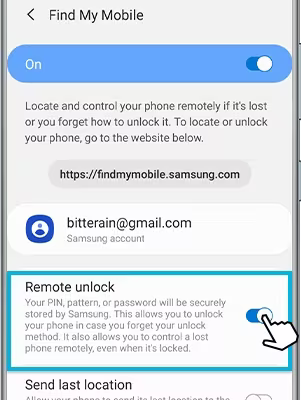
Unlocking Remotely using Find My Mobile Site
With the Remote unlock option in place, it’s time to reveal the ultimate move:
- Use a computer or another internet-connected device.
- Open your web browser and visit Find My Mobile.
- Click on Sign in and enter your Samsung account credentials.
- Select the device you want to unlock from the list.
- Click on Unlock.
- Verify your Samsung account password when prompted and click NEXT.
Your device should now be unlocked!
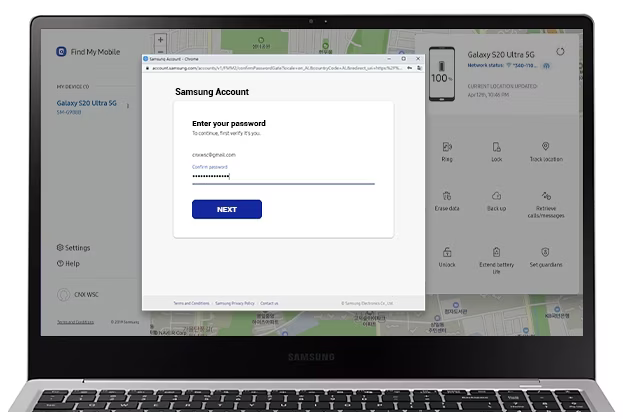
Smart Lock: Your Digital Guardian Angel
Samsung’s Smart Lock feature lets your device automatically unlock in certain trusted conditions, such as when you’re in a trusted location. Here’s how to set it up:
Setting Up Smart Lock:
- Open Settings on your device.
- Go to Biometrics and security.
- Tap on Smart Lock.
- Enter your screen lock method (PIN, pattern, or password).
- Select Trusted places.
- Add your frequently visited locations as trusted places.
When you’re in one of these trusted locations, your device will automatically unlock without requiring you to enter your PIN, pattern, or password.
Additional Options
If the above methods don’t work, you can:
- Reset your password using the Samsung Account Password Reset page.
- Contact a local phone repair store.
- Seek help from a third-party unlocking service.
Don’t let a forgotten PIN, pattern, or password ruin your day. Samsung provides multiple tools to help you regain control of your device. The Find My Mobile feature and Smart Lock options are your reliable allies in these situations. Enable these features today and enjoy the peace of mind that comes with knowing you can effortlessly unlock your device whenever you need to.
